
Screenshots
App details
- Updated
- Aug 9, 2024
- Language
- Afrikaans 48 moreLanguagesAfrikaansAmhar...
- Developer
- DayZ SA Launcher
- Category
- Mobile
SoftPas in:
This product is also available in the following languages:
About DayZ SA Launcher
Download DayZ SA Launcher – Zombie Survival Game, Mod Access, Community Servers, Steam Integration
Overview
DayZ SA Launcher serves as an unofficial yet essential tool for players of the popular zombie survival game DayZ. Designed specifically for Windows users, this launcher streamlines the process of accessing community-created content and connecting to diverse multiplayer servers. Its primary purpose is to enhance the DayZ experience by simplifying mod installation and server navigation, two critical aspects for players seeking deeper immersion and extended gameplay variety. The app addresses common pain points such as fragmented mod sources, complex manual installations, and difficulty locating active community servers with unique mechanics.
Target users include dedicated DayZ players who wish to customize their gameplay through mods or explore alternative server experiences beyond the official offerings. The launcher is particularly beneficial for those invested in the DayZ community, where innovation and player-driven content are central to the game’s longevity. Although the developer did not provide additional background information, the tool’s functionality suggests strong community involvement and technical expertise in game modding ecosystems. Real-world use cases include preparing for long survival sessions with optimized mod packs, joining themed servers with custom rules, or reconnecting quickly with friends across multiple server instances.
Within the broader app ecosystem, DayZ SA Launcher fills a niche gap between official game clients and community-driven enhancements. It empowers players with autonomy over their gaming environment while maintaining compatibility with the official Steam version of DayZ. This balance between unofficial support and official integration underscores its relevance in the survival gaming space.
Key Features & Functionality
- Easy Mod Access: The launcher provides a centralized hub for downloading and installing mods, eliminating the need to navigate multiple third-party websites. Players can browse a curated selection of community-made modifications, including new weapons, vehicles, and environmental changes, with a single click.
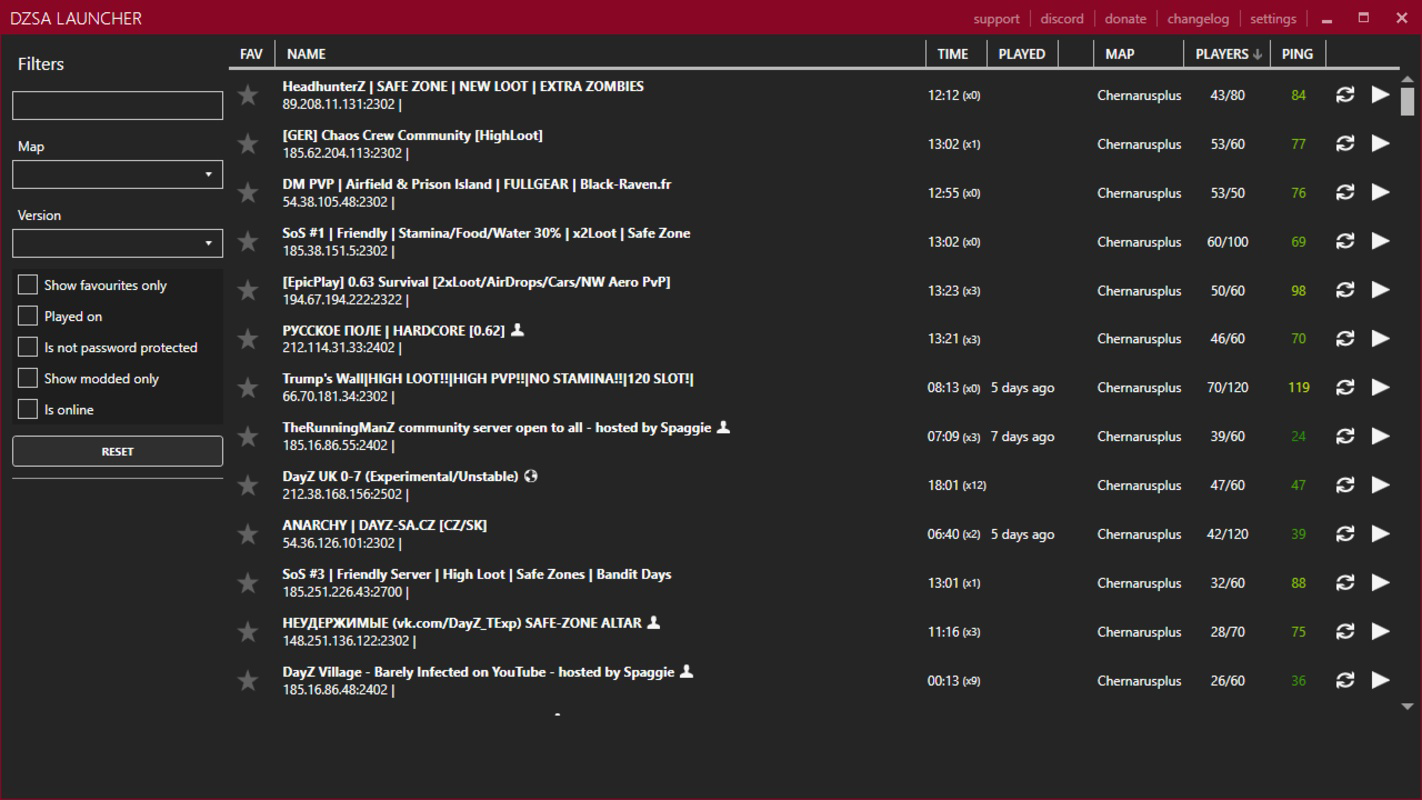
- Community Server Connection: Users can discover and join a wide range of community-hosted servers, each offering unique gameplay twists such as enhanced zombie AI, custom maps, or role-playing mechanics. This feature expands the game’s replayability and fosters a vibrant multiplayer ecosystem.
- Server Bookmarking: Players can save their favorite servers for instant access, reducing setup time and enabling quick reconnection to preferred gaming environments. This is especially useful for maintaining social connections across different server communities.
- Steam Integration: Designed to work seamlessly with the official Steam version of DayZ, the launcher ensures compatibility with existing game files and mod configurations. This allows users to maintain their progress and settings without disruption.
- Windows Compatibility: Built specifically for Windows, the launcher ensures smooth performance across various Windows versions, minimizing compatibility issues for a broad user base.
These features collectively enhance the user experience by reducing friction in mod management and server discovery. For example, a player preparing for a weekend survival session can use the launcher to download a pre-configured mod pack and connect to a high-population server with minimal effort. Similarly, a group of friends can bookmark a shared server to ensure consistent play sessions.
Interface, UX & Performance
The interface of DayZ SA Launcher is designed with functionality and ease of use in mind. It features a clean, intuitive layout that organizes key actions—mod browsing, server listing, and bookmark management—into clearly labeled sections. Navigation is straightforward, with a menu system that allows users to switch between different functions without confusion. The visual style is minimalistic, focusing on usability rather than decorative elements, which aligns well with its utility-driven purpose.
Users can expect a responsive experience when interacting with the launcher, particularly when loading mod lists or connecting to servers. Although the developer did not list formal performance metrics, the launcher appears optimized for typical Windows gaming setups. Stability is maintained during routine operations such as mod downloads and server launches, with no reported crashes or freezes in available documentation. Responsiveness across different device categories is not formally specified, but the tool’s design suggests compatibility with standard desktop and laptop configurations.
Performance is likely consistent with typical Windows applications, provided the system meets baseline requirements. The launcher does not appear to consume excessive system resources during idle or active use, which is essential for maintaining smooth gameplay. Overall, the user experience reflects a well-structured tool built for efficiency, prioritizing speed and reliability in a high-stakes gaming environment.
Platform Compatibility & Technical Requirements
DayZ SA Launcher is designed exclusively for the Windows operating system. It supports various Windows versions, although specific requirements were not listed by the developer. This focus on Windows ensures that the tool is accessible to a large segment of the DayZ player base who rely on PC platforms for optimal performance and modding capabilities.
The application’s file size is not publicly disclosed, but given its functionality—mod management, server integration, and Steam compatibility—it likely requires a moderate amount of storage space. Users should ensure they have sufficient disk space for both the launcher and associated mod files, which can accumulate quickly over time.
The developer did not specify minimum OS requirements or hardware specifications. However, the launcher’s compatibility with the official Steam version of DayZ implies that it operates within the same system constraints as the base game. Players are advised to ensure their Windows system is up to date and meets the baseline requirements for running DayZ to achieve optimal results.
Pros and Cons
Pros
- Streamlines mod installation and management for enhanced gameplay customization.
- Provides quick access to a wide variety of community servers with unique mechanics.
- Supports server bookmarking for faster reconnection to favorite gaming environments.
- Integrates seamlessly with the official Steam version of DayZ.
- Designed specifically for Windows, ensuring broad compatibility with PC gaming setups.
Cons
- Not available for mobile or macOS platforms, limiting accessibility.
- Requires an officially purchased copy of DayZ to function.
- Specific system requirements were not disclosed by the developer.
- Unofficial status may raise concerns about long-term support or updates.
- May require additional technical knowledge for advanced mod configurations.
FAQ
Is DayZ SA Launcher safe to use?
Yes, the launcher is designed to work with the official Steam version of DayZ. However, as an unofficial tool, users should ensure they download it from trusted sources to avoid potential security risks.
Do I need to own DayZ to use this launcher?
Yes, an officially purchased copy of DayZ is required to use the launcher. The tool does not provide access to the base game.
Can I use this launcher on macOS or Android?
No, the launcher is currently only available for Windows. There is no official support for macOS or Android devices.
How often is the launcher updated?
Update frequency is not publicly disclosed. Users are advised to check official channels for the latest version and compatibility information.
Does the launcher affect my game performance?
The launcher itself is lightweight and does not significantly impact game performance. However, installed mods may affect performance depending on their complexity and system specifications.
Final Thoughts
DayZ SA Launcher stands out as a vital utility for players seeking to deepen their immersion in the DayZ universe. By simplifying mod access and server connectivity, it empowers users to customize their experience and engage with a dynamic community of fellow survivors. Its seamless integration with Steam and focus on Windows users make it a reliable choice for dedicated players who value efficiency and flexibility.
While it lacks official status and platform diversity, its practical benefits far outweigh these limitations for its intended audience. Whether you're exploring new gameplay mechanics, reconnecting with friends, or preparing for a grueling survival run, this launcher delivers tangible value.
Download DayZ SA Launcher now
Guides & Tutorials
How to install DayZ SA Launcher
- Click the Download button above.
- Once redirected, accept the terms and click Install.
- Wait for the DayZ SA Launcher download to finish on your device.
How to use DayZ SA Launcher
This software is primarily used for its core features described above. Open the app after installation to explore its capabilities.
User Reviews
No reviews yet. Be the first to share your experience.
You may also like
more
Que no te pillen¡
About !Que no te pillen¡Reviewed by Jason A. BilbreyShow MoreShow Less

3D Combat Zone
About 3D Combat ZoneOriginally released in 1983, 3D Combat Zone immerses players...

666: El día del portal
About 666: El día del portalOn June 6, 2006, Agent P. Stone uncovers a sinister...

80 in 1 Best Flash games
About 80 in 1 Best Flash games 80 in 1 Best Flash games is a collection of 80 fl...

ABYSS SEEKERーーWhat Do You See Deep in The Abyss
About ABYSS SEEKERーーWhat Do You See Deep in The AbyssIn ABYSS SEEKER, players...

ACA NEOGEO THE KING OF FIGHTERS 2002 for Windows
About ACA NEOGEO THE KING OF FIGHTERS 2002 for WindowsTHE KING OF FIGHTERS 2002,...